 ACF-powered content

BoxMetric is a free WordPress plugin that adds a moving and storage volume calculator to your website. Your customers list what they are moving, room by room, see the total in cubic feet or cubic metres, and get the van, container and storage unit that fit. When they finish, you receive the whole list as a quote request, so you can price the job without a home survey.
We built BoxMetric for moving companies, removal firms, man and van services and self-storage operators, and it is now listed on WordPress.org. The current version is 1.0.1, tested up to WordPress 7.1, and it is free under the GPL. This guide shows what it does, how to install it, how to set it up for your own vans and storage units, and how to put it on a page in a few minutes.
What BoxMetric does for a moving company
Most moving quotes start with a phone call and a guess. The customer says "a two bed flat", nobody mentions the garage or the loft, and the van turns out too small on the day. BoxMetric moves that first conversation onto your website, in a format you can actually price.
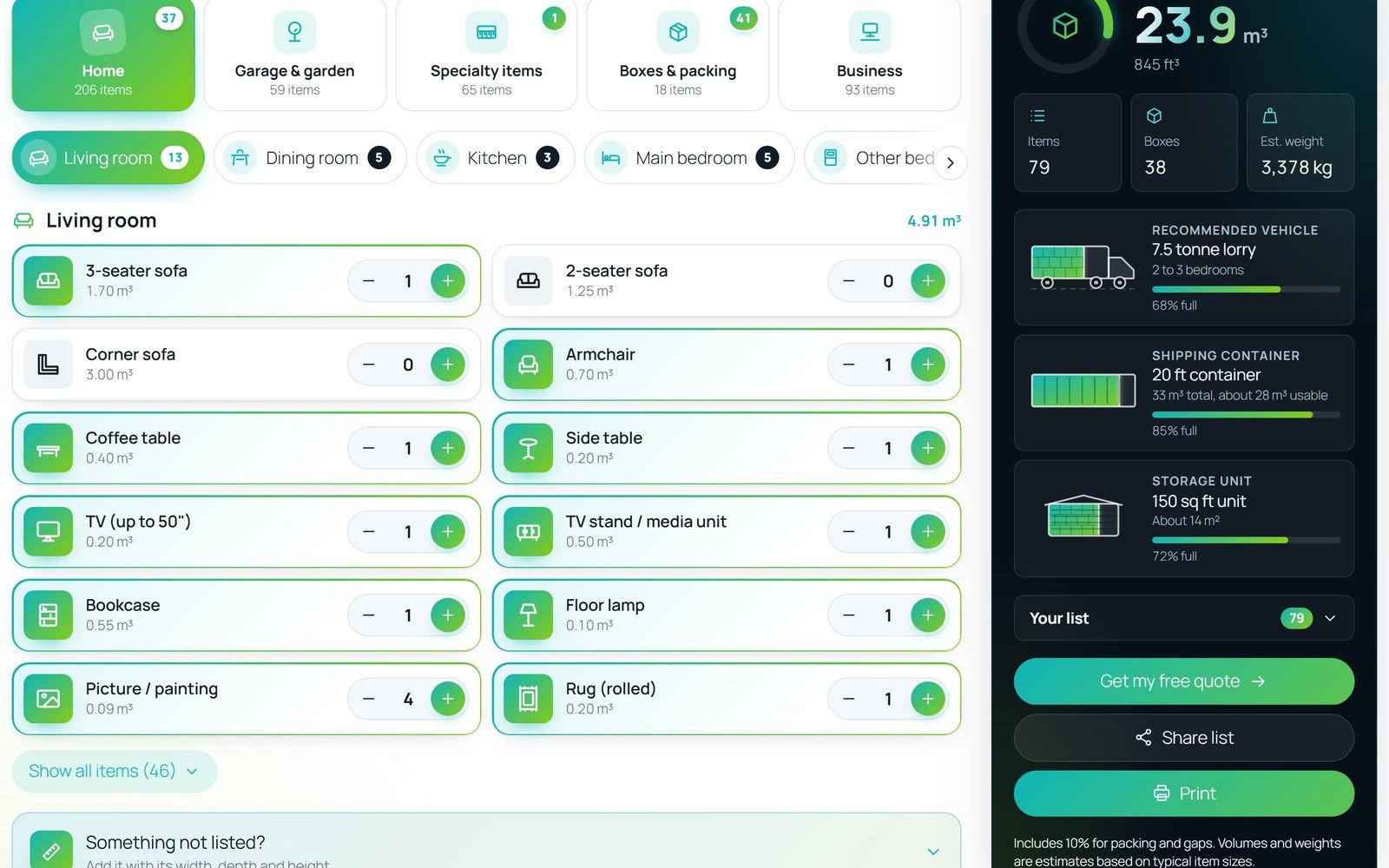
On the customer side, the calculator works like a shopping list for a move. People choose a category (Home, Garage and garden, Specialty items, Boxes and packing, or Business), pick a room and tap the items they own. The total updates as they go, with the estimated weight and the number of boxes. A packing margin is added for the gaps when loading, and you can change it.
On your side, each request arrives with the item list, total volume, weight, both addresses, floors and lifts, parking, the moving date and any extra services such as packing or storage. It is the same information you would collect on a survey visit, typed in by the customer.
| Feature | What the customer sees | What you get |
|---|---|---|
| Room by room inventory | 441 items in 21 rooms, with search in their own words | A full item list with volumes |
| Quick Starts | One tap fills a typical studio, 1 to 5 bedroom home, office, shop or café | A quick way to start a list |
| What fits | The van, container and storage unit, drawn filling up | A best-fit vehicle on every request |
| Box estimator | Five quick questions suggest box counts | Boxes already in the quote |
| Forgotten areas check | A reminder about rooms they skipped | Forgotten areas added before sending |
| Leads | A short quote form | Statuses, follow-ups, notes and exports |
How to install BoxMetric
BoxMetric is in the official WordPress plugin directory, so installing it takes about a minute and you get updates from the normal Plugins screen.
- Plugins > Add New
- Search "BoxMetric"
- Install Now
- Activate
- Open BoxMetric > Settings
- In your WordPress admin, go to Plugins > Add New.
- Search for BoxMetric.
- Click Install Now, then Activate.
- A new BoxMetric menu appears in the admin, with Overview, Rooms & items, Vehicles & storage, Leads and Settings.
You need WordPress 6.7 or newer and PHP 7.4 or newer. If your host cannot install from the directory, download the zip from the WordPress.org page and upload it under Plugins > Add New > Upload Plugin.
Set it up in five minutes
The defaults work out of the box, but a few settings make the calculator yours.
Choose your region and unit
Open BoxMetric > Settings. Pick your region (the United Kingdom, Europe, the United States or Australia) and the unit your customers think in: cubic feet or cubic metres (1 cubic metre is about 35.3 cubic feet). Customers can still switch units on the page. Then enter the email address that should receive quote requests.
Add your own vans and storage units
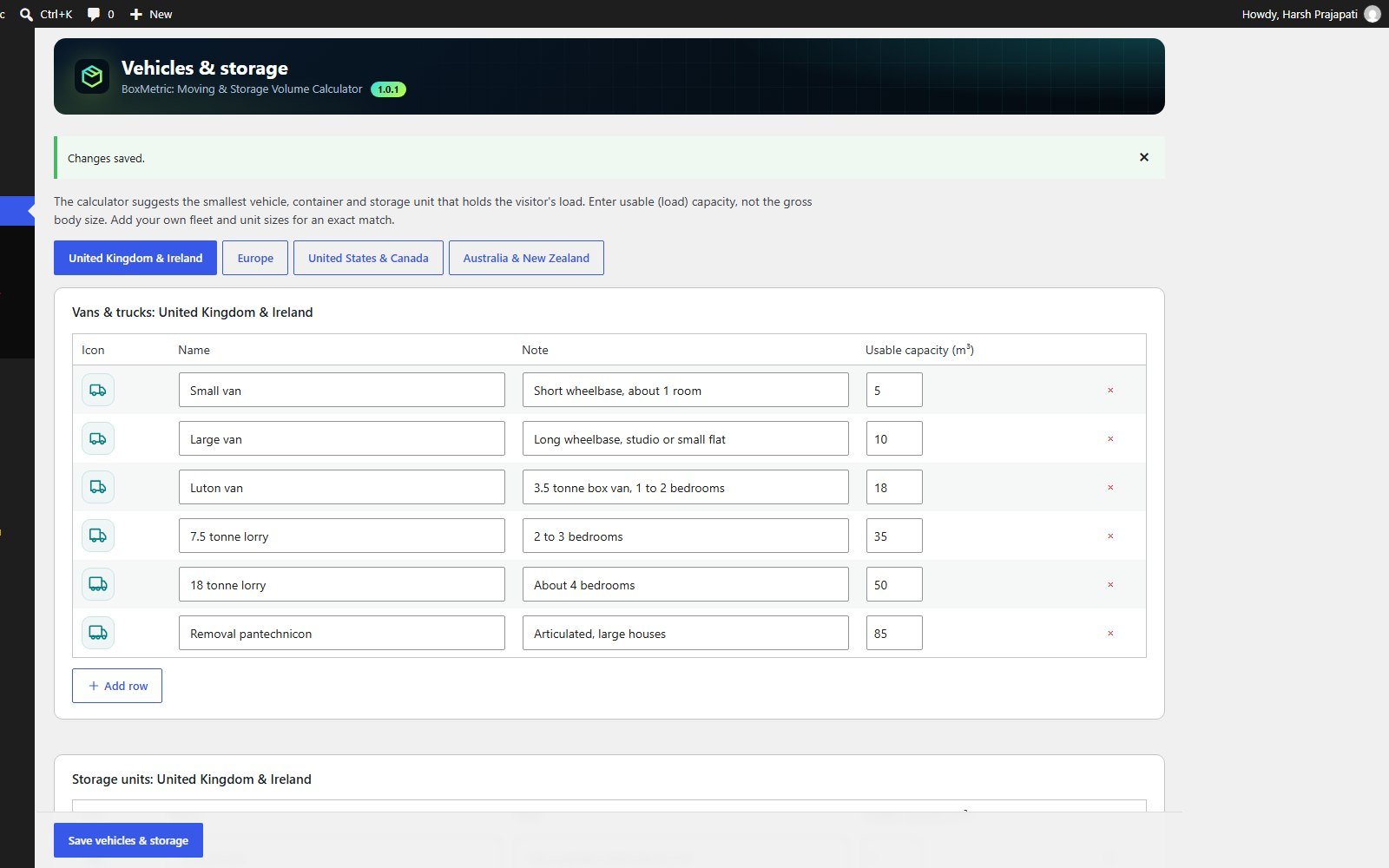
Open BoxMetric > Vehicles & storage. Each region has a table of vans and trucks, shipping containers and storage units with their usable capacity. Edit the sizes to match your fleet, or add your own, for example "Our Luton with tail lift". The calculator then suggests the smallest vehicle and unit from your own list that holds the load.
Check the rooms and items
Open BoxMetric > Rooms & items if you want to rename an item, change a volume, hide a room or add something you move often, such as salon chairs or gym equipment. You can choose from more than 220 icons and export or import the whole list as JSON. The volumes are checked against a dozen published moving company calculators, so most companies only adjust a few.
Add the calculator to a page
You have two ways to show the calculator, and both give the same result.
- The block: edit any page, add the BoxMetric Volume Calculator block and publish. The block sidebar has the options below.
- The shortcode: paste
[msvcalc_calculator]anywhere shortcodes work, including page builders such as Elementor.
The shortcode accepts options when one page needs something different:
[msvcalc_calculator units="ft3" theme="dark" quote="yes" accent="#0fb5ba"]units:m3orft3theme:light,darkorautoquote:yesorno, to show or hide the quote formtitleandintro: your own heading and intro textaccent: a hex colour to match your brand
Scripts and styles load only on pages that show the calculator, so the rest of your site stays as fast as it was. It also works with page caching, because the form's security token refreshes itself when needed.
Turn requests into booked moves
A calculator only pays back if the requests get answered, so BoxMetric includes a small leads screen instead of leaving everything in your inbox.
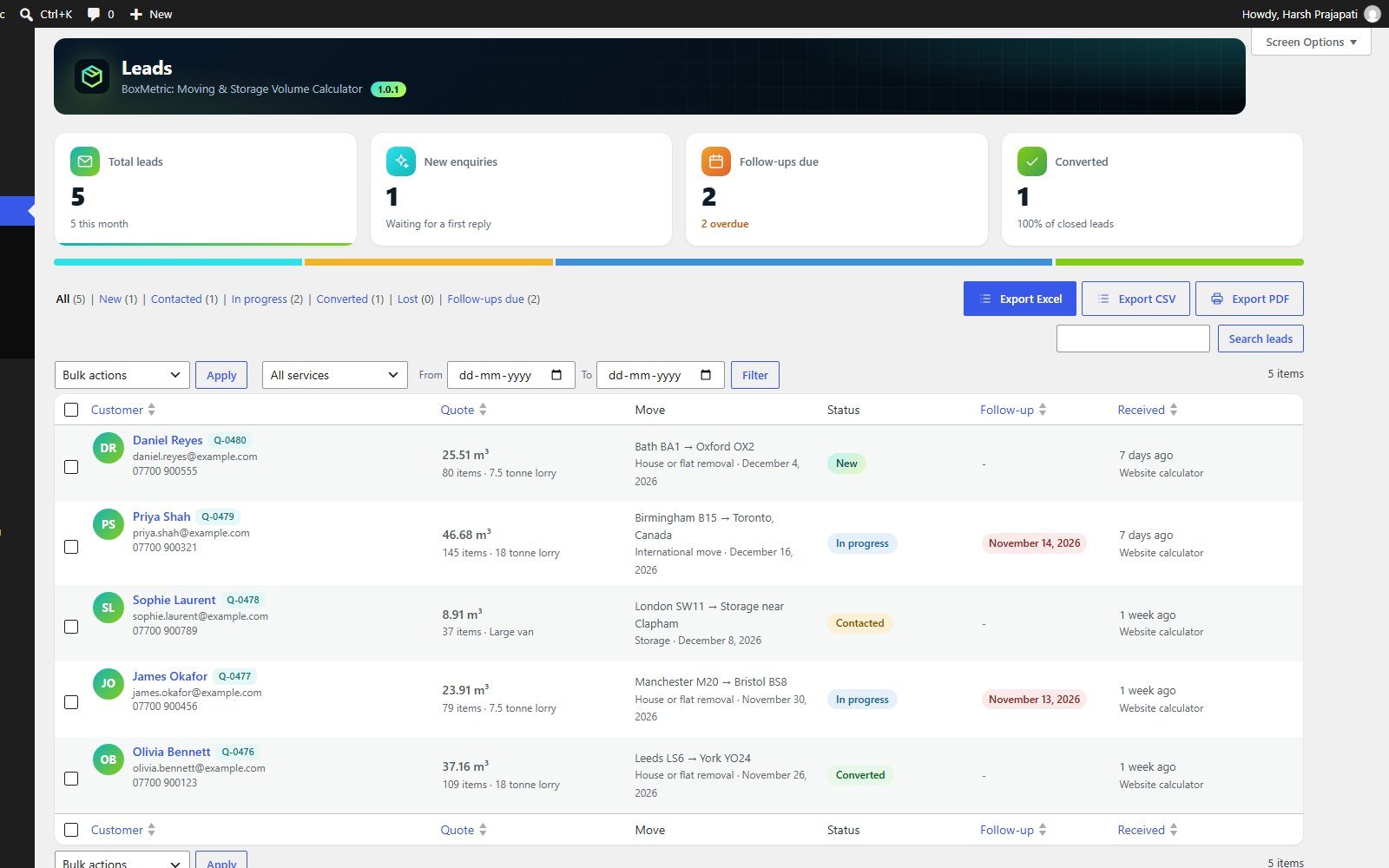
Every request lands under BoxMetric > Leads with a status (New, Contacted, In progress, Converted or Lost), a follow-up date and private notes. Open a lead to see the full inventory room by room, call or email the customer in one click, and download a branded PDF report for your team. You can export all leads as a branded Excel file, a plain CSV for your CRM, or a PDF.
If emails from your site often go missing, the request is still saved in Leads and flagged with a "Send email again" button. For reliable delivery, send WordPress email through a proper mail service; our guide to WordPress SMTP plugins explains the options.
Privacy, spam and your data
BoxMetric has no external fonts, scripts or services, no tracking and no credit links. Nothing on your site, in your emails or on printouts points back to the plugin.
- Spam protection uses a hidden field, a security token and a limit on requests per visitor, with no captcha and no third-party service.
- Privacy tools: quote requests are included in WordPress's personal data export and erase tools, and old requests can be deleted automatically.
- Your data stays put: when you delete the plugin, your settings, items and leads are kept unless you turn on "Remove data" in the settings.
When you need more than the free plugin
BoxMetric covers the common case: a mover or storage company that wants a useful calculator and clean quote requests. Some businesses need more, such as prices shown to the customer, a link to their booking system or a CRM, or a calculator for a different trade entirely. That is where a custom build makes sense.
If you are weighing that up, our guide on custom versus existing plugins walks through the decision, and lead generation calculators explains why a calculator can work better than a plain contact form. When the form needs to feed a CRM, see website to CRM integration. For a calculator built around your own pricing rules, we offer WordPress plugin development.
BoxMetric sits alongside two more free plugins of ours on WordPress.org: MenuNest, for building big WordPress menus without dragging, and FieldPilot, for building ACF field groups from JSON.
Frequently asked questions
Is BoxMetric really free?
Yes. BoxMetric is free and open source under the GPL, listed on WordPress.org, with the code on GitHub. You get the full plugin, and no credit link appears on your site.
Does it show prices to customers?
No. Moving costs depend on your rates, distance, access and services, so the calculator gives you the volume, weight, items, addresses, floors, parking and date. You send the quote yourself, which keeps your pricing private.
Can I use it for storage, office and international moves?
Yes. Quick Starts cover a storage unit, a garage and shed, a small office, a shop and a café, and the results include storage units and 20 ft and 40 ft shipping containers as well as vans and trucks.
Will it slow down my website?
No. Scripts and styles load only on the pages that show the calculator, and it makes no calls to outside services. Pages without the calculator are not affected at all.
Sources
The facts in this article were checked against these pages, last reviewed 15 November 2026.
- BoxMetric: Moving & Storage Volume Calculator, WordPress.orgwordpress.org/plugins/boxmetric-moving-storage-volume-calculator/
- BoxMetric source code, GitHubgithub.com/xaviermsd/boxmetric-moving-storage-volume-calculator
- Shortcodes, WordPress Plugin Handbookdeveloper.wordpress.org/plugins/shortcodes/
- Manage plugins, WordPress Documentationwordpress.org/documentation/article/manage-plugins/