 ACF-powered content

To send an audio sticker on WhatsApp from a computer, install WA Audio Stickers India, our free Chrome extension (it also works in Edge and Brave), open WhatsApp Web, click the lime tab, pick or record a clip, press Make sticker and then Send to this chat. Your friend gets a sticker that plays its sound when they tap it, on Android, iPhone or WhatsApp Web, as long as their WhatsApp is up to date.
We built WA Audio Stickers India at Worklancio because WhatsApp has no public way to send sound stickers from a computer. This guide shows how to install it, make your first sticker in a couple of minutes, keep it under WhatsApp's size limits, and use it safely. It is an unofficial tool: it is not made by, linked to or approved by WhatsApp or Meta.
Prefer to watch? Here is our one-minute Short.
What WhatsApp audio stickers are
An audio sticker, also called a sound sticker, is an animated sticker with a short sound attached. It sits in the chat like any other sticker, with a small speaker badge on top, and the sound plays when the person taps it.
They work well for reactions: a laugh, a famous film line, a cricket commentary moment, or your own voice saying "Kya baat hai!". The problem is making one from your own clip. WhatsApp gives no public way to do it on a computer, which is why we built a small extension that does the whole job inside WhatsApp Web.
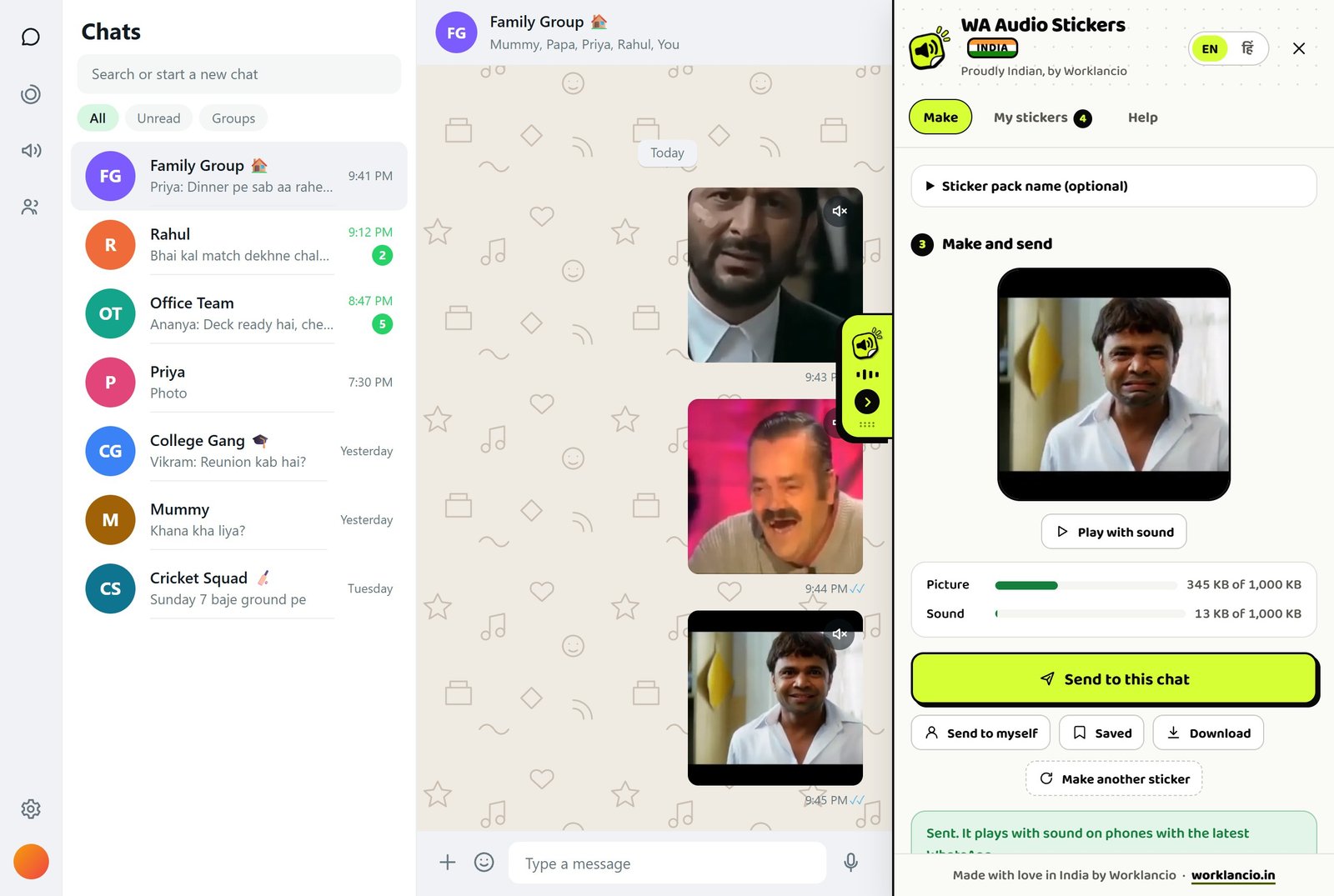
The screenshots in this guide come from our test chat page, with made-up names and sending simulated. The clips are short moments from YouTube meme videos, credited in our README on GitHub (opens in a new tab).
What you need before you start
You need four things. The browser, WhatsApp Web and the extension are all free:
| You need | Details |
|---|---|
| A computer | Windows, Mac or Linux |
| A browser | Chrome, Edge or Brave, version 116 or newer |
| WhatsApp Web | Signed in at web.whatsapp.com with your phone |
| The extension | The latest zip from our GitHub releases page (opens in a new tab) |
It does not run on Firefox or Safari yet, because it needs browser features (Opus encoding through WebCodecs and page-level scripts) that today only Chrome, Edge and Brave have. It also does not run inside the WhatsApp phone app, but there is an easy way to get your stickers onto your phone, which we cover below.
How to install the extension in 2 minutes
You download a zip, unzip it, and load the folder the way Chrome's own guide to loading an unpacked extension (opens in a new tab) describes. It takes about two minutes:
- Download the latest
whatsapp-audio-stickers-indiazip from the releases page (opens in a new tab). - Unzip it. On Windows, right-click the file and choose Extract All. You get a folder with
manifest.jsoninside. - Open the extensions page:
chrome://extensionsin Chrome,edge://extensionsin Edge orbrave://extensionsin Brave. - Turn on Developer mode. The switch is at the top right in Chrome and Brave, and on the left in Edge.
- Click Load unpacked and choose the folder that has
manifest.jsondirectly inside it. - Pin it. A welcome page opens. Click the puzzle icon, then the pin, so the button stays in your toolbar.
How to make and send your first audio sticker
Making a sticker takes six short steps, and everything happens on your own computer.
- Open WhatsApp Web
- Click the lime tab
- Pick or record a clip
- Cut and style
- Make sticker
- Send
1. Open WhatsApp Web and the panel
Go to web.whatsapp.com, open the chat you want, then click the lime tab on the right edge of the screen. You can also click the extension button or press Alt + Shift + S. You can drag the tab up or down, and it remembers where you left it.
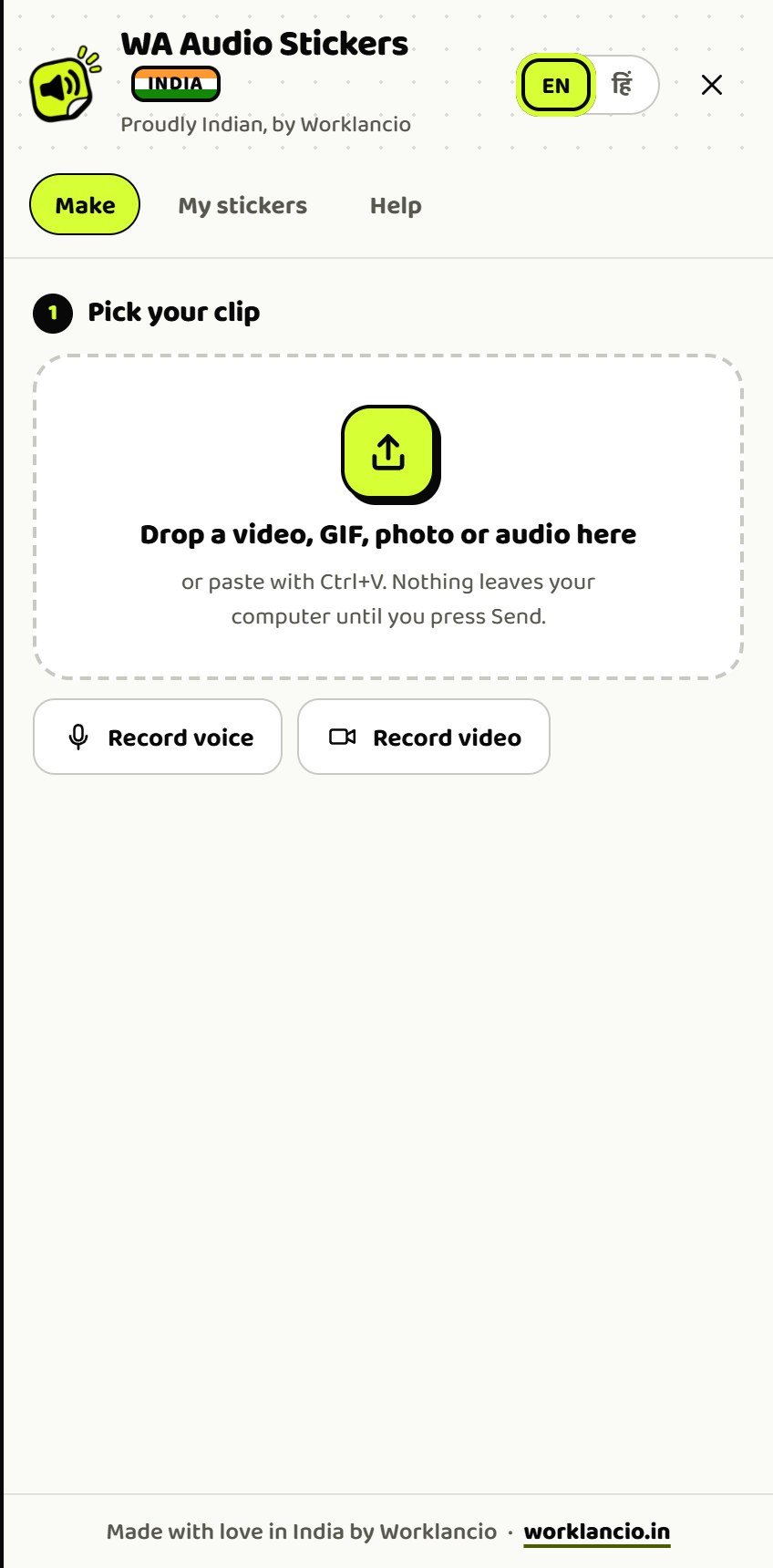
2. Pick your clip, or record one
Drop a video, GIF, photo or audio file on the box, click to choose one, or paste with Ctrl + V. It takes MP4, WebM, MOV, GIF, PNG, JPG, MP3, M4A, WAV and OGG files. No clip? Press Record voice or Record video and make one right there, up to 10 seconds. The browser asks for the microphone or camera first.
3. Cut the best part on the waveform
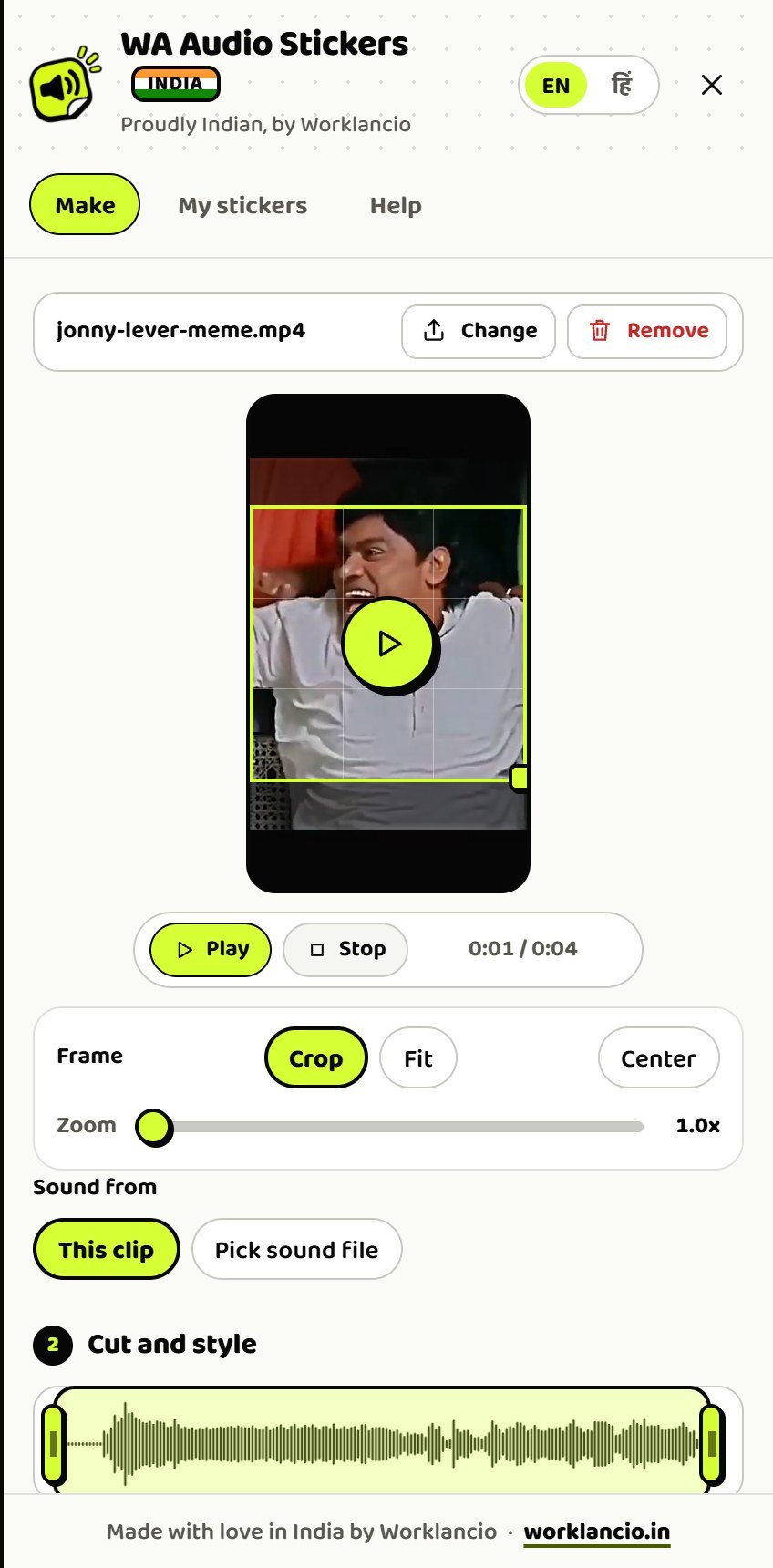
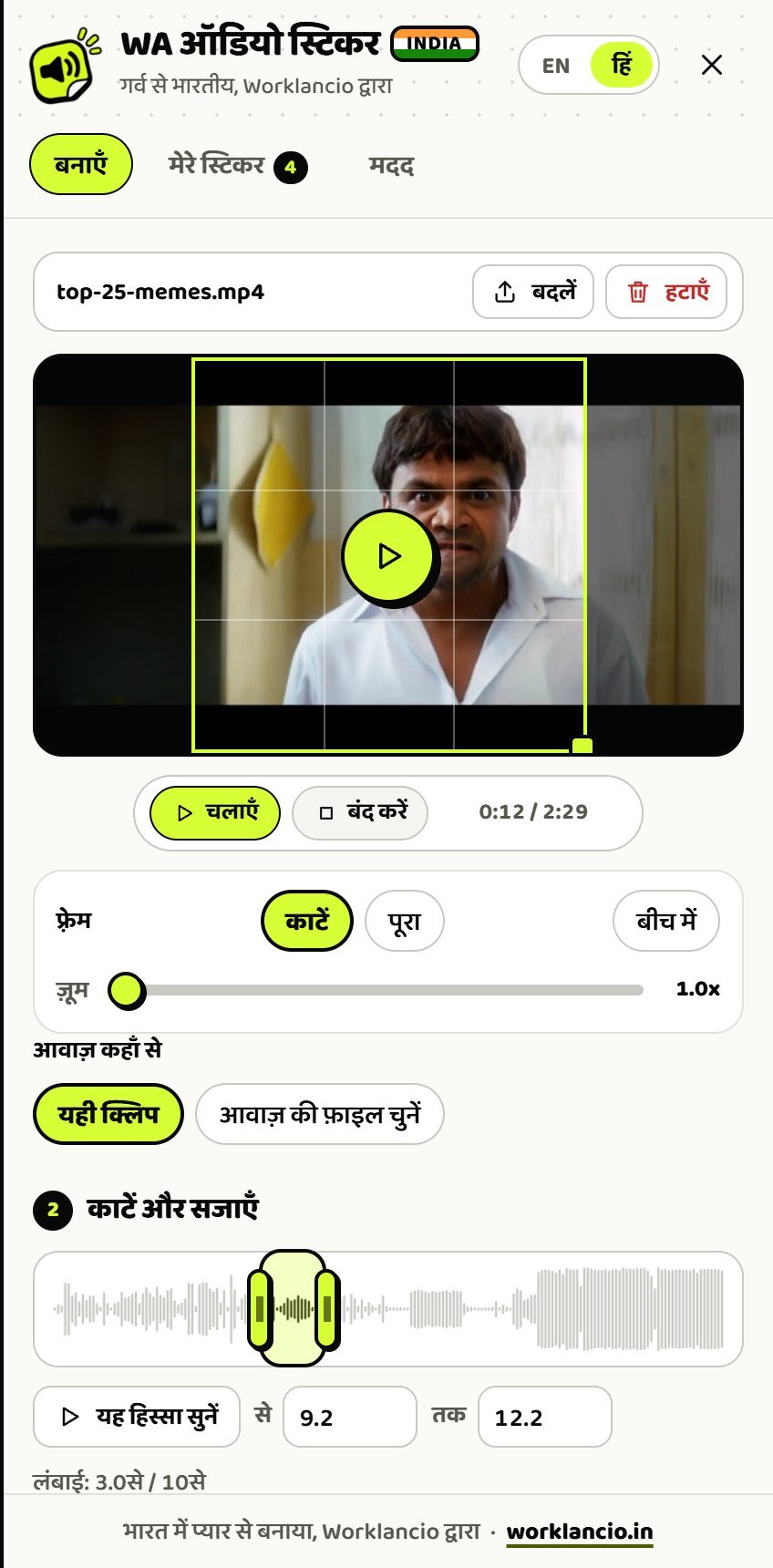
The waveform shows where the sound is loud, so the funny bit is easy to find. Drag the two lime handles to keep up to 10 seconds, press Play under the preview (or Play this part) to play only your trimmed cut, or type exact times in the From and To boxes.
4. Crop, zoom and style it
In Crop mode, drag the lime 1:1 square directly over your video or photo to frame it horizontally and vertically, and drag the corner handle or Zoom slider (1x to 2.5x) to remove black bars on vertical Reels and Shorts. Click Center to reset, or Fit to show the whole picture. Pick a speed from 0.5x to 2x, turn on Boomerang to play the clip forward and then backward, and set the volume. The Make it louder option levels a quiet clip, and Soft fade removes clicks at the start and end. Type a caption in Hindi, English or Hinglish, for example Kya baat hai! or क्या बात है!, and choose the emoji tag WhatsApp uses in sticker search.
5. Make the sticker
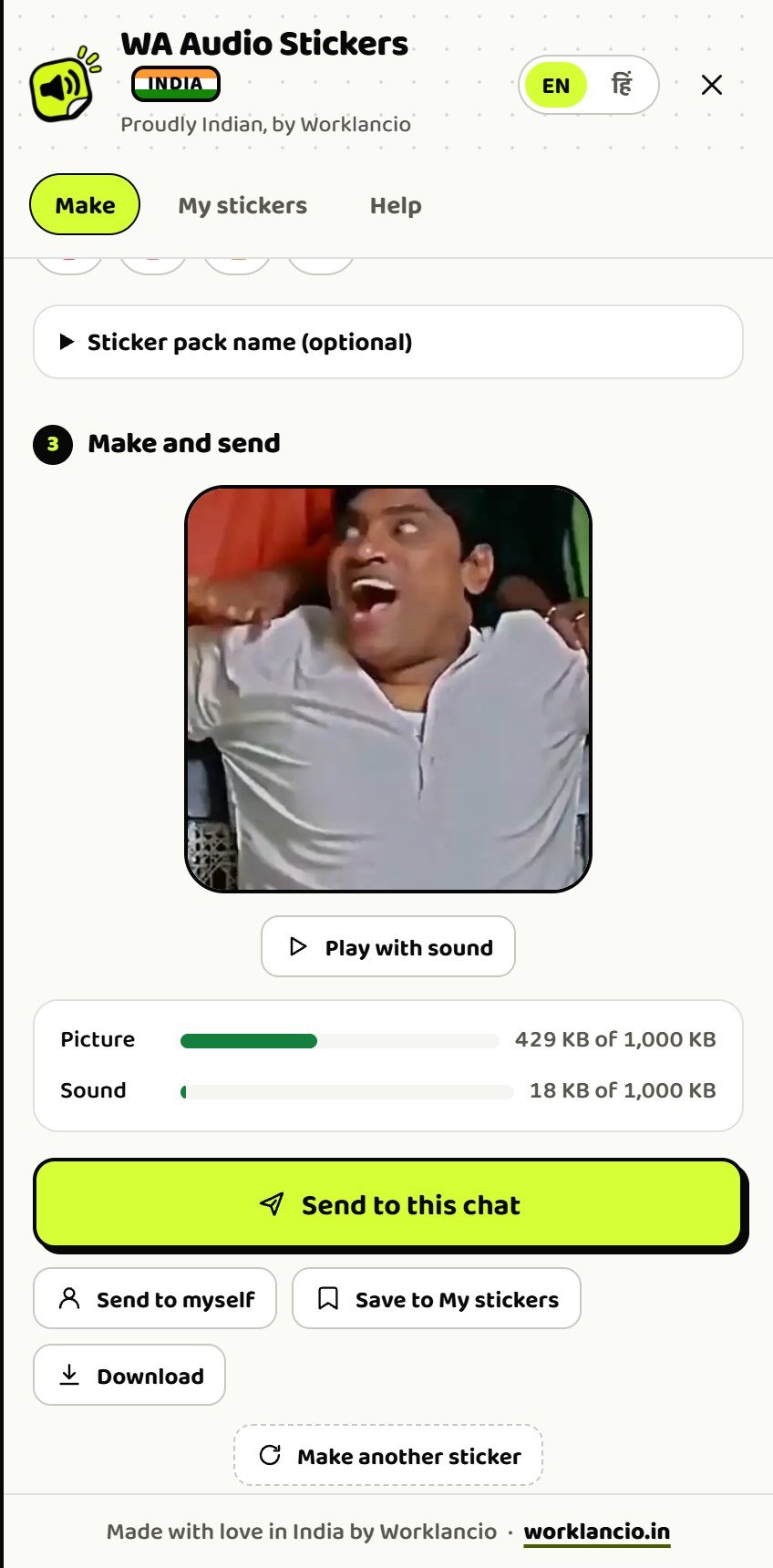
Press Make sticker. The panel smoothly scrolls to the making progress and finished preview, takes a few seconds, and you can cancel at any time. The extension optimizes high-resolution clips toward a crisp 480 KB budget-friendly sweet spot for faster mobile sends, while the size meter checks both picture and sound against WhatsApp's 1,000 KB limits. If a very busy clip still will not fit, cut a shorter part or choose Fit.
6. Send it
Press Send to this chat to send it to the chat you have open, or Send to myself to put it in your own chat. You can also save it to My stickers for next time, or download the picture and sound files. Your friend taps the sticker and hears the sound.
Tips for stickers that look and sound good
Short clips give the sharpest stickers, because WhatsApp limits each sticker to about 1,000 KB for the picture and 1,000 KB for the sound. A few habits help:
- Keep it to 2 to 6 seconds. The extension allows up to 10 seconds, and a short moment stays even sharper.
- Pick calm footage. Clips with lots of fast movement make bigger files, so the picture quality has to drop more.
- Choose Show whole picture under Frame if a wide clip will not fit, instead of cropping to fill the square.
- Use a voice sticker for audio only. With no picture, you get a moving sound wave on a lime card, or the wave on top of a photo you choose.
- Save your favourites. My stickers keeps up to 60 of them, with starred ones on top. Export pack saves them all as one file you can share, and Import pack loads a pack a friend sent you.
- Keep a backup. Saved stickers live in your browser, so removing the extension deletes them. Export a pack first.
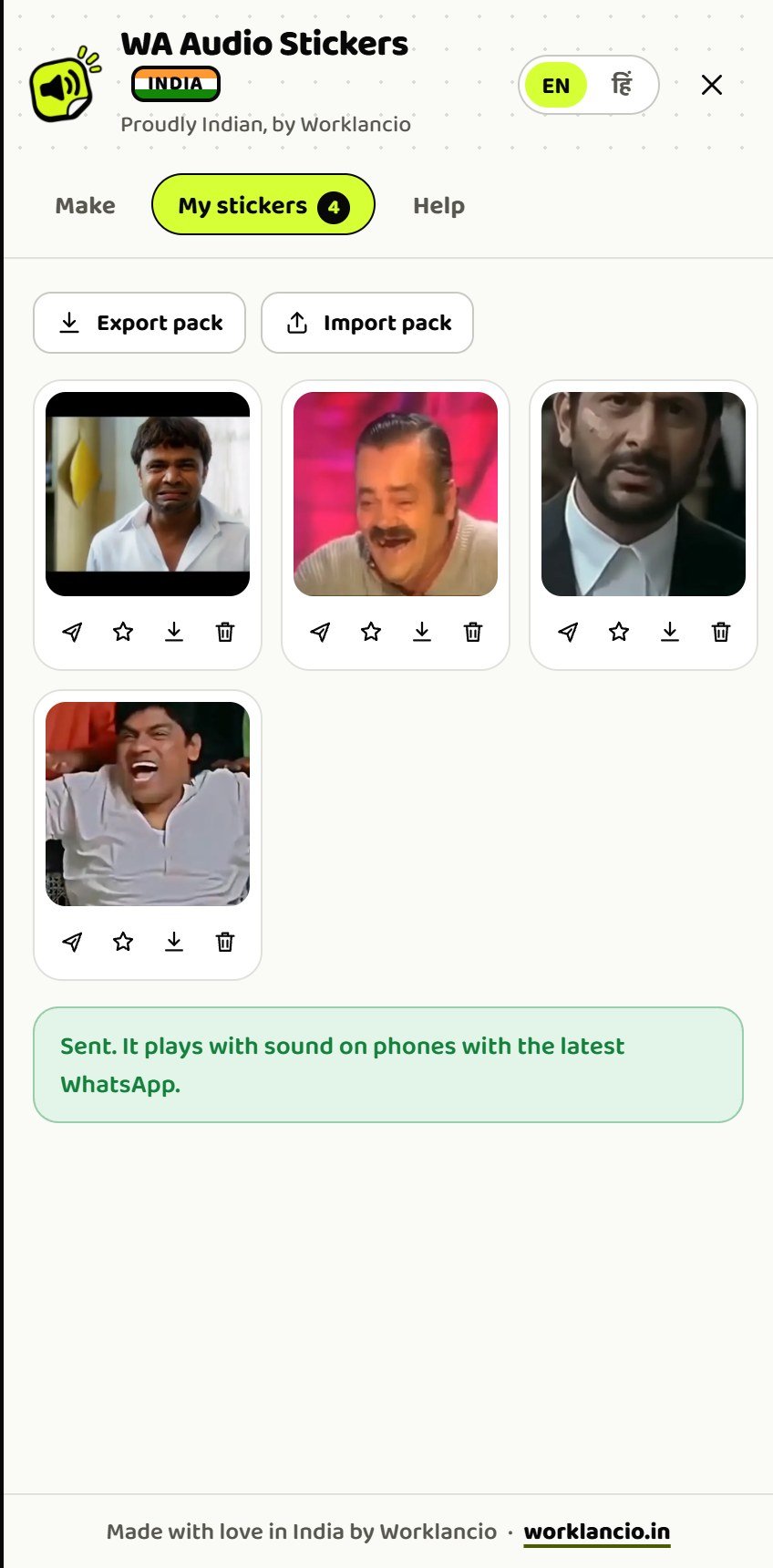
The whole app also works in Hindi. Tap the हिं button in the top corner and every button, tip and error message switches. On first launch it follows your browser's language.
How to get audio stickers on your phone
The extension runs on a computer, but the stickers work everywhere. Use Send to myself, then open your own chat on your phone and forward or star the sticker, so it stays in your phone's sticker tray.
If a friend sees the picture but hears nothing, their WhatsApp needs an update to play sound stickers. Older versions can show "this message is not supported" instead.
Is it safe and private?
The extension was built to do as little as possible outside your own computer. As our security page (opens in a new tab) sets out:
- It only works on web.whatsapp.com and asks only for browser storage, to keep your saved stickers on your computer.
- The microphone and camera are used only when you press Record, through the browser's own permission prompt, and stop when recording ends.
- It has no server. Your clips are never uploaded to us, and there is no tracking, no analytics and no ads.
- It sends only when you click, one sticker at a time with a 3 second gap, and only to the open chat or to yourself. There is no bulk sending, no contact list and no scheduling.
- Your sticker stays end-to-end encrypted. It goes through WhatsApp Web's own upload and send code, like any sticker you send.
- Tests guard these rules. Our automated tests fail if anyone adds a network call, a new permission or HTML string injection.
Because it uses WhatsApp Web's own sending code, a WhatsApp update can break sending until we release a fix. Making and downloading stickers keeps working in the meantime, and the Help tab has a Diagnostics button you can copy into a GitHub issue.
How we built it
We build web apps and browser tools for clients, and WA Audio Stickers India is one we built from scratch for ourselves and for anyone who likes a good reaction sticker. We studied what existing open-source audio sticker tools do, then wrote our own code from a clean start. In plain words, this is what happens when you press Make sticker:
- The sound. The browser's Web Audio API (opens in a new tab) cuts the clip and changes speed and volume. The WebCodecs API (opens in a new tab) encodes it as Opus, and we write the Ogg sound file by hand.
- The picture. Each frame is drawn square with your caption, the browser's own WebP encoder makes each frame, and we build the animated sticker from them with WhatsApp's sticker details inside.
- The fit. Quality, frame rate and size are tuned until both files fit the 1 MB limits.
- The steps. Two small state machines run the sticker job and the recorder, so a sticker that no longer matches the screen is never sent. We explain the idea in why state machines make web apps reliable.
There are no libraries and no server, only features built into the browser. The screens, features and the full story are on our WA Audio Stickers India case study.
A tool like this for your business
A small browser tool can turn a fiddly, repeated job into a few clicks, the same way this one does for stickers. It might add a button to a web app your team uses every day, turn exported data into a ready report, or check orders across two systems.
That is the kind of work we do as custom web application development, with the PHP and JavaScript development behind it. Our free LabelzyKit label cropper is another free tool we built the same way, where the work happens in your browser. If you have an idea, our guide on how to plan a web app MVP shows how we scope a small tool before writing any code.
Frequently asked questions
Is WA Audio Stickers India free?
Yes. It is free and open source under the MIT licence, with no sign-up, no ads and no paid version. The full code is public on GitHub, so anyone can check what it does.
Can my WhatsApp account get banned for using it?
We built it to behave like a person sending a sticker: one at a time, only when you click, only to the open chat. We have no reports of bans from this kind of use, but WhatsApp does not approve any add-ons, so we cannot promise anything. Never use it for bulk messages or spam.
Can I make audio stickers in Hindi?
Yes. Captions work in Hindi, English or Hinglish, drawn in the Baloo 2 font, which has proper Devanagari letters. The whole app can also switch to Hindi with one tap.
Is this an official WhatsApp tool?
No. It is an unofficial, open-source tool made by Worklancio in India. It is not made by, linked to or approved by WhatsApp or Meta.
How do I update to the newest version?
Download the latest zip from the GitHub releases page and unzip it, then copy the new files over your existing extension folder, replacing everything. On your extensions page, click the reload button on WA Audio Stickers India and refresh WhatsApp Web. Keep the same folder: the browser ties your saved stickers to it, so removing the extension and loading a new folder starts with an empty library. Export your sticker pack first as a backup, just in case.
Sources
The facts in this article were checked against these pages, last reviewed 27 November 2026.
- WA Audio Stickers India on GitHub, Worklanciogithub.com/xaviermsd/whatsapp-audio-stickers-india
- WA Audio Stickers India website and guide, Worklancioxaviermsd.github.io/whatsapp-audio-stickers-india/
- Security and privacy, WA Audio Stickers Indiagithub.com/xaviermsd/whatsapp-audio-stickers-india/blob/main/SECURITY.md
- Latest release, WA Audio Stickers Indiagithub.com/xaviermsd/whatsapp-audio-stickers-india/releases/latest
- Hello World: load an unpacked extension, Chrome for Developersdeveloper.chrome.com/docs/extensions/get-started/tutorial/hello-world
- Web Audio API, MDNdeveloper.mozilla.org/en-US/docs/Web/API/Web_Audio_API
- WebCodecs API, MDNdeveloper.mozilla.org/en-US/docs/Web/API/WebCodecs_API