 ACF-powered content

LabelzyKit is a free toolkit for Indian online sellers, and its first tool, the shipping label cropper, is live now. Drop your Flipkart and Meesho label PDFs, even mixed together, and it finds every label, sorts them by SKU, courier or marketplace, and gives you one sharp print file for a 4x6 thermal printer or plain A4 paper. There is no login, no ads and no page limit, and your files never leave your device.
We built it at Worklancio because cropping labels is the first job of every seller's morning, and it should be quick and simple. This post shows what LabelzyKit does, how to print clean labels with it, why your buyers' addresses stay private, and a little about how we built it. If you just want to start, you can crop your Flipkart and Meesho labels free (opens in a new tab) right now.
The morning label problem
If you sell on Flipkart or Meesho, you know the routine. Orders come in, you download the label PDFs from Flipkart Seller Hub or the Meesho Supplier Panel, and before the courier arrives you need every label printed, stuck on the right packet and checked.
The PDFs are not made for a thermal printer. A label often shares the page with a tax invoice, and printing the whole page on a 4x6 roll shrinks the label until the barcode is hard to scan. Printing on A4 wastes most of the sheet. So sellers crop.
Cropping by hand in a PDF editor is slow. Some online tools ask you to log in or upload the file, and that file carries your buyers' names, phone numbers and addresses.
So we built LabelzyKit to do the whole job for free, without any of that. Shipping labels, sorted. Free forever.
What LabelzyKit does, in three steps
- Drop your label PDFs
- Check the summary
- Pick size, sort and print
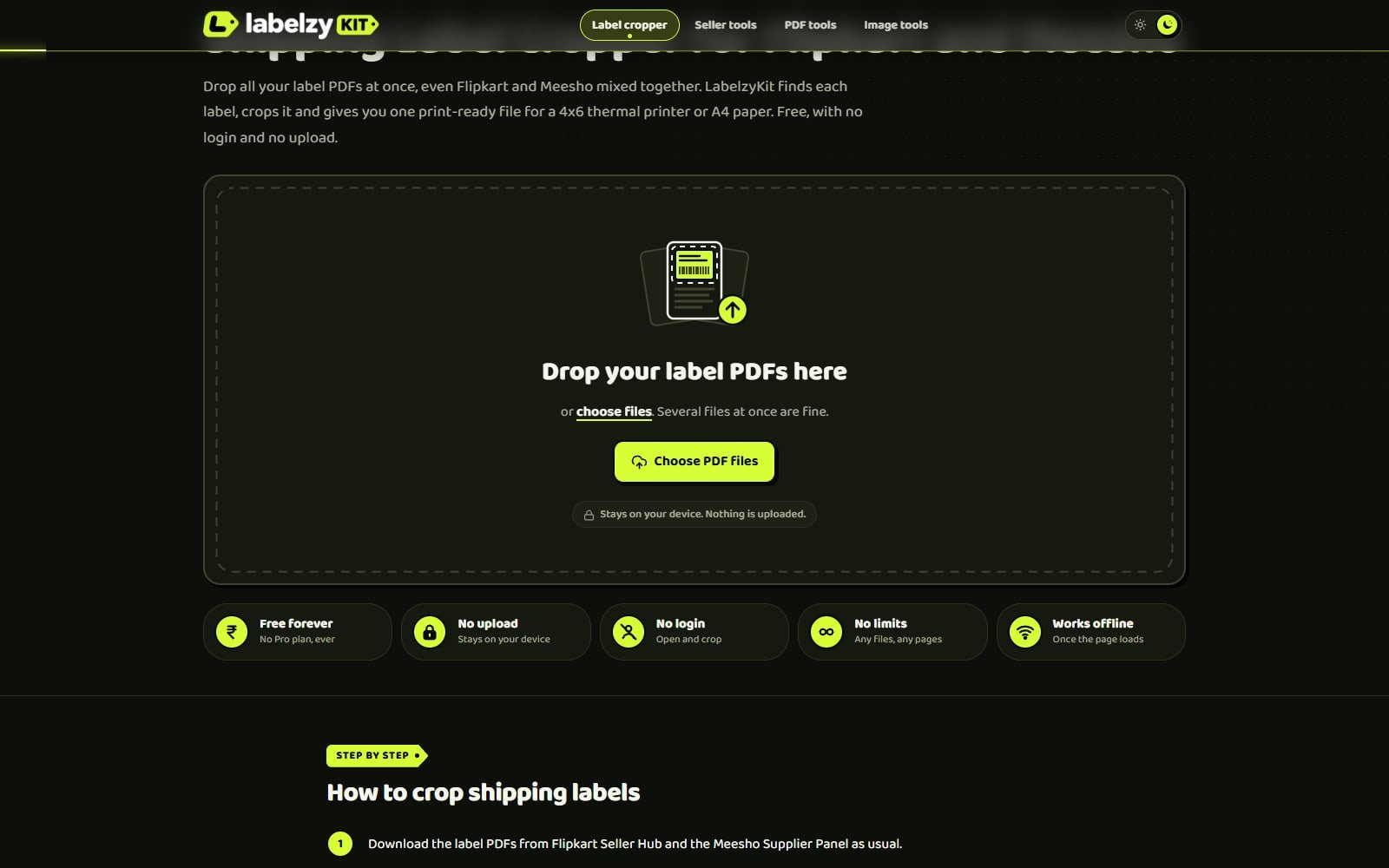
1. Drop. Open the shipping label cropper (opens in a new tab) and drop all of today's label PDFs at once. Flipkart and Meesho files can go in together. Nothing is uploaded: your browser opens the files on your own phone or computer.
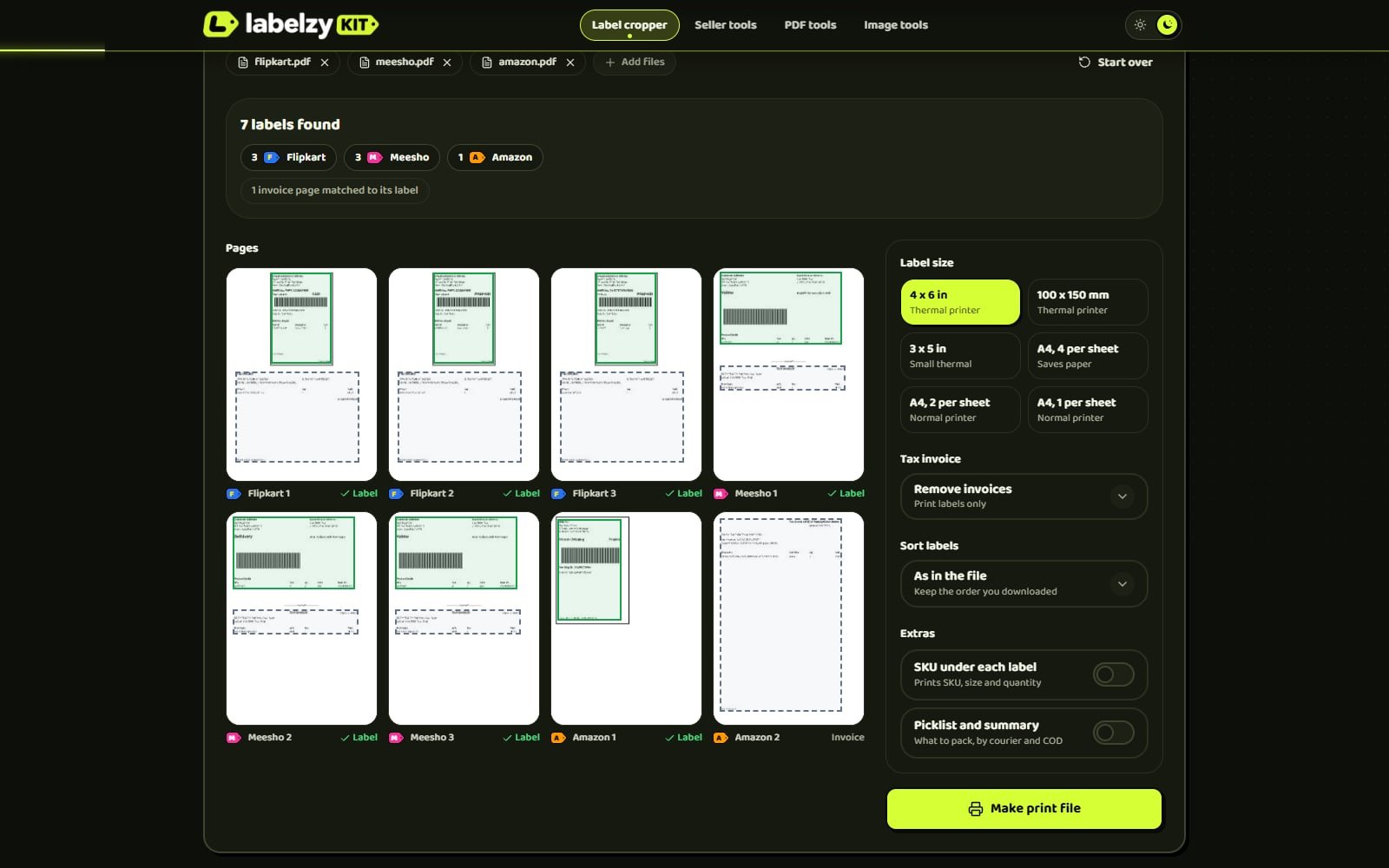
2. Check. LabelzyKit reads every page, finds each label by its printed text, and shows you a summary. Each label is marked with its marketplace, invoices are matched to their labels, and any page it cannot read clearly is flagged so you can take a look before printing. If one looks wrong, you can print that order from the original PDF.
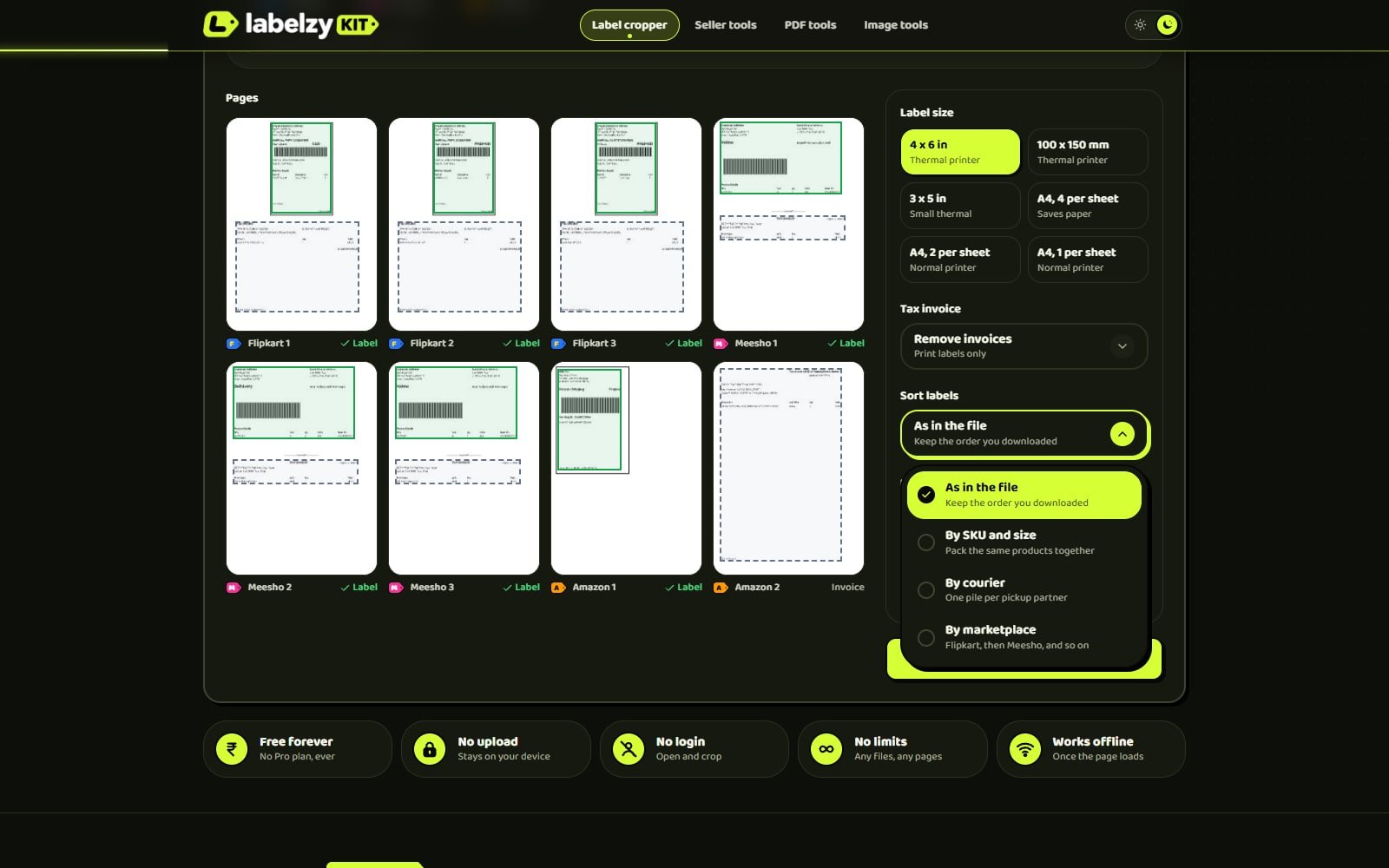
3. Print. Choose your label size, what to do with the tax invoices (remove them, put each one after its label, or put them all at the end) and the sort order. Then download or print one file.
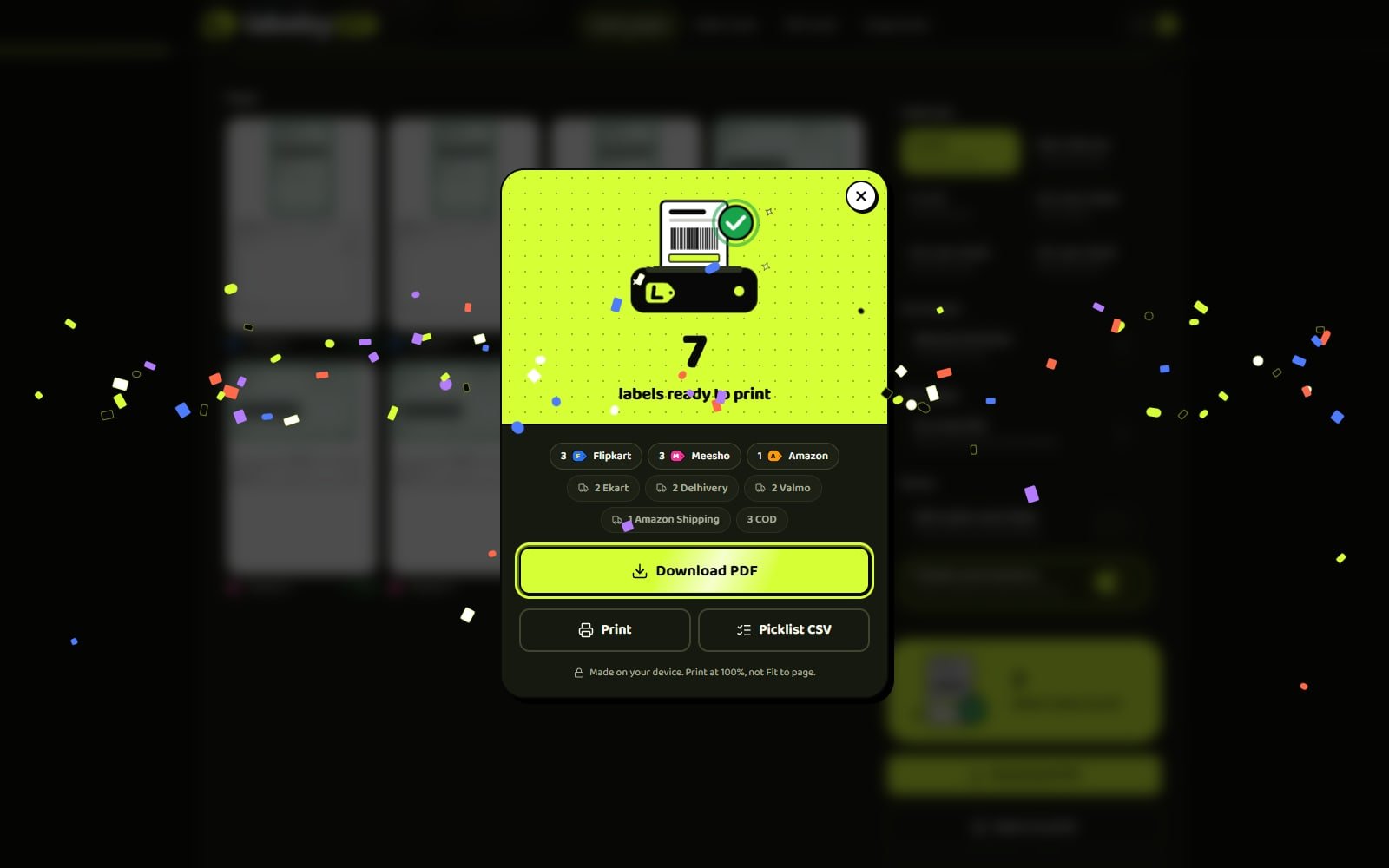
Then stick the labels on and hand the parcels over. Your next batch of labels, cropped before your chai cools.
If you only sell on one marketplace, the dedicated pages work the same way: crop Flipkart labels to 4x6 or A4 (opens in a new tab), with or without the invoice, or crop Meesho labels to 4x6 (opens in a new tab) and sort them by SKU, size and colour.
The paid features, free for everyone
In LabelzyKit, sorting and picklists are part of the free tool, and there is no Pro plan.
| Feature | What it does for you |
|---|---|
| Mixed marketplaces | Flipkart and Meesho labels in one upload, one print file |
| Label sizes | 4x6 in, 100x150 mm, 3x5 in, or A4 with 1, 2 or 4 labels and cut guides |
| Sort by SKU and size | Labels come out in the order you pack, so the same product sits together |
| Sort by courier or marketplace | Hand each courier its own stack at pickup |
| Picklist (PDF and CSV) | Every SKU, size and quantity, so you can pull stock before packing |
| Courier and COD count | How many parcels go to each courier, and how many are cash on delivery |
| Invoice handling | Remove invoices, keep each after its label, or move them all to the end |
There are no file or page limits and no watermark. The tool remembers your print settings in your own browser, so tomorrow it opens the way you left it.
Your files stay on your device. We made sure of it.
Label PDFs carry your buyers' names, phone numbers and addresses. We did not want that data on our servers, or anyone's.
LabelzyKit does all the work inside your browser. When you drop a PDF, your phone or computer reads it, finds the labels and builds the print file. As our privacy promise (opens in a new tab) says, the file is not uploaded to LabelzyKit or anyone else, and we keep no copy because we never had one. Your settings and theme choice are saved in your own browser's storage and never sent to us.
Two side benefits come from this:
- It works offline once loaded. If the internet drops during the morning rush, the tool keeps working.
- No waiting on uploads. A big batch does not have to travel to a server and back.
We count visits in a privacy-friendly way, without cookies and without tracking you across other sites, and there are no ads or advertising trackers.
How to print clean, scannable labels
Most printing problems come from printer settings, not the printer. Our guide to printing labels on a thermal printer (opens in a new tab) covers it in detail; here are the essentials:
- Print at 100% scale. Never "Fit to page", which shrinks the label. If you print from a browser, turn off headers and footers.
- Match the paper size. Use 4x6 in (100x150 mm) direct thermal label rolls, and set the same size in the printer driver. A driver left on A4 is a common reason for small labels with big margins.
- Calibrate after a new roll. On many thermal printers this is a long press on the feed button. If part of the label is cut off, check the paper size and calibrate again.
- No thermal printer? Choose "A4, 4 per sheet" and print on a normal printer. The sheet has cut guides, and four labels fit on one A4 sheet.
- Print the PDF, not a screenshot. LabelzyKit copies each label as it is in the PDF, not as a picture, so the barcode stays as clear as the original. A screenshot or photo of a label can blur the barcode.
How we built it
We build web apps for clients, and LabelzyKit is one we built for ourselves and for sellers. For the curious, here is what is under the hood, in plain words.
- Astro, React and TypeScript. The pages load fast and are easy for Google to read, and the cropper itself is an interactive React app.
- pdf.js and pdf-lib. pdf.js (opens in a new tab), from Mozilla, reads the label PDFs in the browser. pdf-lib (opens in a new tab) builds the new print file. Because the labels are copied as they are in the PDF, not as photos, they stay as sharp as the original.
- Web Workers. The heavy reading happens in a Web Worker (opens in a new tab), a background helper in the browser, so the page stays smooth while a big batch is processed.
- State machines. Every step (loading, reading, checking, building, printing) is a clear state with clear rules for what can happen next. This helps the app avoid double prints, half-built files and stuck screens. We explain the idea in why state machines make web apps reliable.
- SEO from day one. Each marketplace and each common task has its own page, written for the way sellers search.
The same approach goes into the custom web applications we build for clients, and the full-stack web development behind them. You can see the screens, features and stack on our LabelzyKit project page.
Coming next
Today, the shipping label cropper for Flipkart and Meesho is the one live tool. These are next, and none of them work yet. The LabelzyKit home page (opens in a new tab) marks each one as coming soon:
- Amazon and Myntra label crop (coming soon). Amazon Easy Ship and Self Ship labels, and Myntra labels. Snapdeal and Shopsy are also listed as coming soon.
- PDF tools (coming soon). Merge PDF, split PDF, compress PDF, PDF to JPG and JPG to PDF.
- Image tools (coming soon). Compress image, compress to 50 KB for upload forms, a passport photo maker, and HEIC to JPG.
Each coming soon card on the site has a vote link, so sellers can tell us which tool they want first. We will build them on the same rules: free, no ads, no login, and your files stay on your device.
Like LabelzyKit? We can build one for your business
Many businesses have a daily job like label cropping: a slow, repeated task that a small, focused tool could take off your plate. It might be turning order exports into a packing list, building quotes from a price sheet, or checking stock across two systems.
That is the kind of tool we build. If you sell online and are still setting things up, our checklist for starting an online store in India is a good place to begin. If you already know what you need, our guide on how to plan a web app MVP shows how we scope a small tool before writing any code.
Try LabelzyKit free (opens in a new tab), and if you want a tool like it for your own business, talk to us. Every project starts with a free call and a fixed written quote.
Frequently asked questions
Is LabelzyKit really free?
Yes. It is free forever, with no ads, no login, no Pro plan, no page limits and no watermark. We built it as our own product to help sellers, and to show the kind of web apps we build.
Are my label files uploaded anywhere?
No. Everything happens in your browser, on your own device. The files are not sent to LabelzyKit or anyone else, LabelzyKit only holds them while the tab is open, and your original PDFs stay in your downloads.
Which marketplaces does it support?
Flipkart and Meesho today, and you can mix them in one upload. Amazon and Myntra label crop are coming soon, with Snapdeal and Shopsy also listed as coming soon.
Does it work on a phone?
Yes. It runs in Chrome, Safari, Edge and Firefox on Android, iPhone, Windows and Mac, and you can add it to your home screen.
What size should I print Flipkart and Meesho labels?
For a thermal printer, 4x6 in (100x150 mm) is the usual choice. Without one, use A4 with 4 labels per sheet and cut along the guides. Always print at 100% scale.
Sources
The facts in this article were checked against these pages, last reviewed 21 November 2026.
- LabelzyKit: free shipping label cropperlabelzykit.vercel.app/
- LabelzyKit privacy promiselabelzykit.vercel.app/privacy/
- LabelzyKit guide: print labels on a thermal printerlabelzykit.vercel.app/guides/print-labels-thermal-printer/
- PDF.js, Mozillamozilla.github.io/pdf.js/
- pdf-lib documentationpdf-lib.js.org/
- Web Workers API, MDNdeveloper.mozilla.org/en-US/docs/Web/API/Web_Workers_API